



Version 2.2.0
Donation & Custom Price
A premium WooCommerce extension that lets your customers define their own prices. Perfect for accepting online donations, enabling “Pay-What-You-Want” pricing, or creating custom service quote checkout pages.
Core Features
Flexible Pricing
For Your Store
Accept custom donations, allow customers to name their price (Pay-What-You-Want), or set up dynamic payment pages for custom-quoted services directly in WooCommerce.
- New WooCommerce Product Type: Adds a native "Custom Price Product" type directly to WooCommerce
- Donation / Price Input Field: Renders a clean input field on the frontend allowing users to input their desired price.
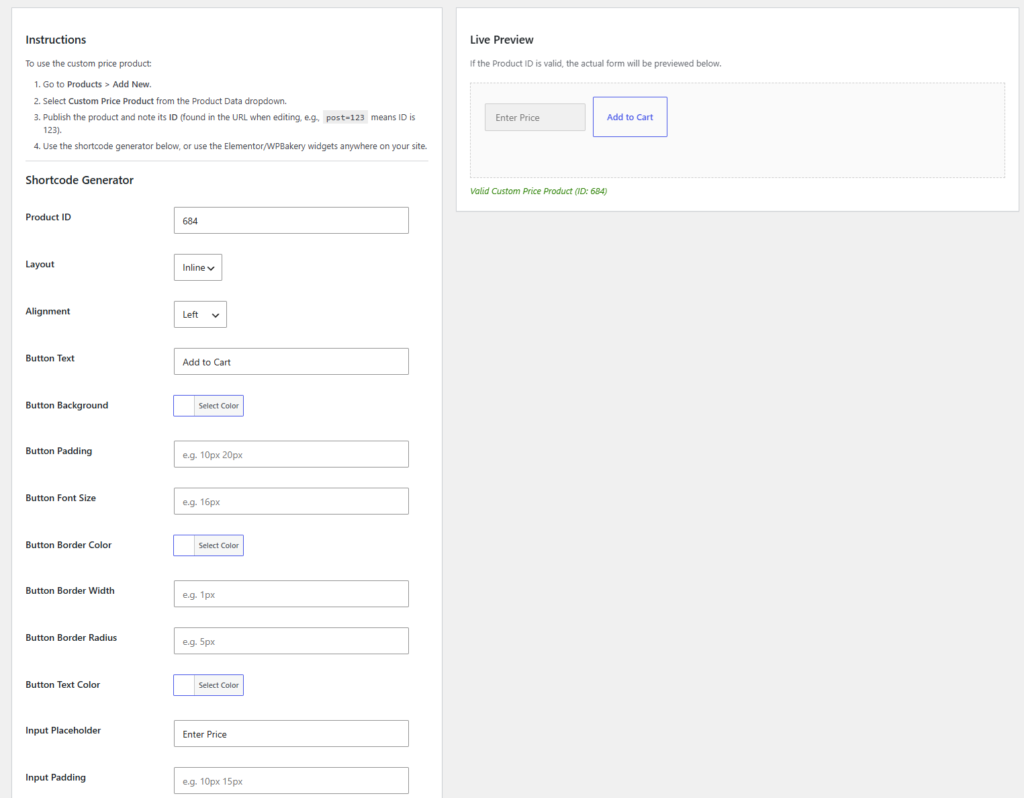
- Live Shortcode Generator: Rebuilt in v2.2.0 with instant client-side rendering so admin styling changes show up immediately without preview delays.
- Elementor & WPBakery Widgets: Native integration with major page builders, exposing rich design and layout options.
- Advanced Styling Controls: Easily adjust button and input padding, border width, border radius, border colors, and font-size.
- AJAX Add to Cart: Adds items asynchronously to the WooCommerce cart, automatically updating theme cart fragments.
Perfect For
- Charities and non-profit organizations accepting donations
- Creators and musicians offering "Pay What You Want" pricing
- Freelancers and agencies accepting custom invoice payments
- Stores requiring deposit payments or flexible pricing models
Requirements
- WordPress 5.8 or higher
- WooCommerce 6.0 or higher
- PHP 7.4 or higher
- Tested up to WordPress 6.8 & WooCommerce 9.8
Quick & Easy Installation
Get up and running in minutes.
- Upload the
custom-price-productfolder to the/wp-content/plugins/directory, or install it directly through the WordPress plugins screen. - Activate the plugin through the ‘Plugins’ screen in WordPress.
- Create a new product by going to Products > Add New, and choose Custom Price Product in the Product Data dropdown box.
- Use the shortcode
[custom_price_product id="YOUR_PRODUCT_ID"]the Elementor widget, or the WPBakery element to place your custom price input field on any page.
Frequently Asked Questions
Common questions about the Custom Price Product plugin.
Does it support AJAX Add to Cart?
Yes! The custom price add to cart widget works with AJAX seamlessly, ensuring users aren’t reloaded needlessly if your theme and settings support it.
Is it compatible with WooCommerce HPOS?
Yes! The plugin fully supports WooCommerce High-Performance Order Storage (HPOS / Custom Order Tables).
Can I customize the design of the input fields and buttons?
Absolutely! The plugin includes comprehensive styling controls. You can adjust padding, font size, border width, border radius, and colors. These settings are available in the Shortcode Generator, Elementor, and WPBakery widgets.
Does the shortcode generator preview load quickly?
Yes! Starting with version 2.2.0, the live preview uses instant client-side rendering. There is no lag or slow AJAX calls when you type or change style settings.
How do I create a custom price product?
Simply go to Products > Add New in your WordPress dashboard, and in the Product Data dropdown, select “Custom Price Product”. Ensure you configure the settings and display it on your frontend using our widgets or shortcodes.